
Tucker Carlson Network
Tucker Carlson NetworkNews & Magazines
4.120.00 Reviews
- Version
- 1.102.1
- Installs
- 10.00K
- Age Rating
- Everyone 10+
Screenshots



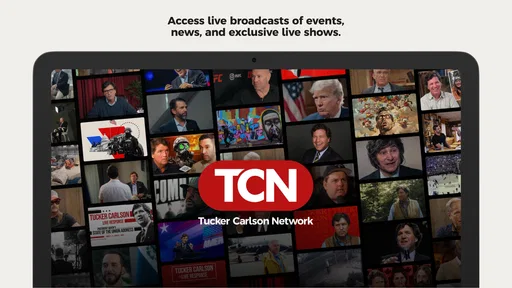
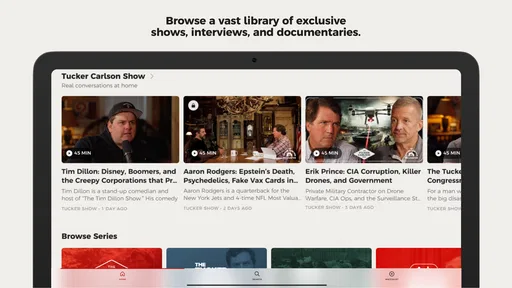
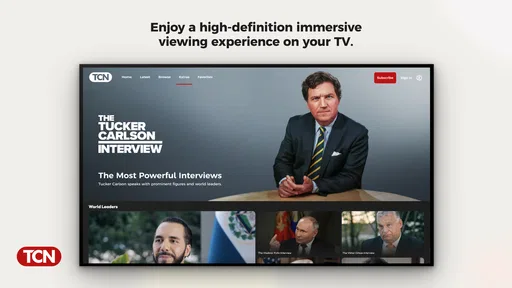
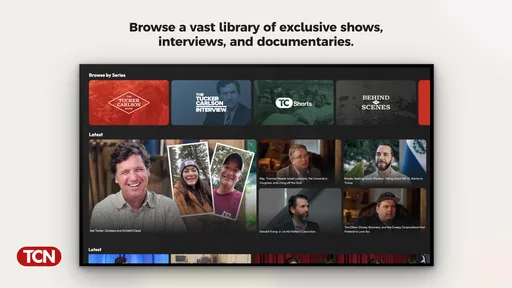
Our Review of Tucker Carlson Network
 Analysis by Appyee
I judge a news app by a practical question: does it help me decide what to watch, and does it fit the way I actually follow current events? Tucker Carlson Network is a focused destination for Tucker Carlson’s programming rather than a broad newsstand. That focus is its main appeal, but it also shapes who will get the most from it. If you already seek out his commentary, having the material gathered in one place can be convenient; if you want a range of reporting and viewpoints, you’ll probably want other sources alongside it.
A focused place for one commentator’s programming
The app sits in the News & Magazines category, but I wouldn’t approach it like a general headlines app. Its identity is tied to content from Tucker Carlson Network, the developer, and the experience is best understood as a way to follow that network’s output. The app is free to install, which makes it easy to explore, while in-app purchases run from $8.99 to $71.99 per item. I’d check the purchase details before committing, especially if you’re only interested in occasional viewing.
That distinction matters in everyday use. A traditional news app tries to surface stories from many publishers, often in a fast-moving feed. This one is more useful when you know whose work you want to watch and would rather go directly to it than search across services. It is a complement to a broader news routine, not a replacement for one.
What the current release tells me
The current version is 1.100.2, and the app first appeared on August 1, 2024. Those facts tell me where the product stands today, but they don’t prove that any particular feature arrived in a specific update. I’d treat the version number as a practical reference when checking compatibility or troubleshooting, rather than as a promise of a major redesign.
For existing users, the useful question is whether the app continues to fit their habits: can they get to the programs they want, keep track of what they intend to watch, and avoid spending time hunting for a familiar item? My advice is to judge it by those repeat-use tasks instead of expecting every release to change how the service works. The app requires Android 5.0 or later, so it can run on a wide range of Android devices, though actual playback comfort will depend on the device and connection you use.
Getting value without turning it into a habit of endless viewing
I’d use the app with a simple routine: open it when I have a specific subject or program in mind, choose something that fits the time I have, and save anything I want to return to. That small bit of planning makes a focused video library easier to manage than browsing without an endpoint. If you’re trying it for the first time, sample the free-to-access parts of the experience before deciding whether a paid item makes sense for you.
One useful trade-off is attention. Long-form commentary can be more satisfying than catching fragments in a social feed, but it also asks for more time and concentration. I’d save a substantial episode for a walk, a commute as a passenger, or a quiet break when you can listen properly—not for a moment when you need to keep switching tasks. If you’re driving, keep your attention on the road and avoid handling the phone.
Who is likely to enjoy it—and who may prefer another app
This is most appealing to people who already follow Carlson or specifically want his network’s perspective in a dedicated place. It may also suit someone who prefers video and commentary to scanning short text updates. On the other hand, anyone looking for a neutral roundup, local alerts, a wide selection of publications, or a deliberate mix of political viewpoints should use a multi-source news app or established news outlets as well. A single commentator’s platform can be convenient, but it cannot provide the breadth of a whole news diet.
The audience rating is Everyone 10+, so it is not presented as an adults-only app. Still, I’d make the choice based on the content and tone you want in your household rather than relying on the age label alone. The app has a 4.1 average from around 66 ratings, with about 20 written reviews, and has passed 10,000 installs. That suggests some existing interest, though a modest rating pool is not enough to settle whether its style will work for you.
A realistic way to fit it into a news day
Picture checking the headlines over breakfast and noticing a topic you want to understand more deeply. I’d use a broad news source first to establish what happened, then open this app if I wanted Carlson’s take on that subject. If there is a program I can’t finish, saving it for later is a more reliable plan than trusting myself to remember its title. This workflow keeps commentary in context and helps separate the underlying event from one person’s interpretation of it.
That distinction is especially useful when a subject is contentious. I wouldn’t treat a forceful argument as a substitute for checking primary documents, original reporting, or another credible account. The app can be one stop in a deliberate routine; it works less well as the only place you go to decide what is happening.
Your Gateway to Tucker's World
First things first, the moment you open the app, you're greeted with a sleek and intuitive interface. It’s like stepping into Tucker’s own media realm. The design is clean, making it super easy to navigate, whether you're tech-savvy or just getting started with apps.
Features and Content
Now, let's talk about the content because that’s what we’re here for, right? The Tucker Carlson Network app is like a treasure trove for anyone who loves in-depth commentary and political analysis. You’ll find everything from his latest episodes to exclusive interviews that you won’t catch on TV.
One of my favorite features is the "Tucker’s Picks" section. It’s like a curated list of must-watch segments that he personally recommends. If you're short on time and want the highlights, this is your go-to spot.
Interactivity at Its Best
What’s cool about this app is that it’s not just a passive experience. There’s a community feel to it, with options to comment on episodes and join discussions. It’s like being part of a virtual fan club where you can share your thoughts and see what others are saying.
Plus, there’s a nifty feature that allows you to bookmark episodes. If you’re like me and have a habit of starting something and coming back to it later, this is a lifesaver. Just hit bookmark, and you can pick up right where you left off.
Technical Performance
On the technical side, the app runs smoothly. I tested it on both Android and iOS, and I didn’t encounter any major hiccups. The videos stream seamlessly, and the audio quality is top-notch. Whether you're on Wi-Fi or using mobile data, the performance is consistent. And trust me, there’s nothing more annoying than buffering issues when you’re trying to enjoy a show.
Notifications and Updates
Another aspect I appreciate is the notification system. It’s not overly intrusive, but it keeps you in the loop with the latest updates and episode releases. If you’re a fan of staying current with political news, you’ll find this incredibly useful.
And for those worried about data usage, the app offers settings to control video quality, which is a thoughtful touch for conserving data.
Room for Improvement
Of course, no app is perfect. While the Tucker Carlson Network app offers a lot, I did notice a few areas that could use some polish. For instance, the search functionality could be more robust. Sometimes finding specific older episodes can be a bit of a hunt.
Additionally, I think adding more personalization options would enhance the user experience. Imagine having a tailored feed based on your viewing habits—now that would be something!
Making the most of saved episodes and recommendations
When I’m browsing a library of commentary, I try not to treat a recommended segment as a complete summary of a topic. A curated pick can be a handy starting point, particularly when I have only a few minutes, but it reflects an editorial choice about what deserves attention. I’d use it to find a thread worth following, then look for the full episode or compare the subject with other coverage if it matters to me.
Bookmarks are most useful when I give them a purpose. I might save one episode I genuinely plan to finish, rather than bookmarking a long queue that becomes another pile to sort through. If the app doesn’t make an older item easy to rediscover, keeping a note of its title or subject outside the app can be a low-tech workaround. It is not as seamless as a strong search tool, but it prevents a promising segment from disappearing into the backlog.
Questions worth settling before paying
Is it worth installing if I’m only curious? Since the app is free to install, trying its available material is a reasonable way to see whether the format and point of view suit you. Is everything included at no cost? No: in-app purchases are part of the model, so I would distinguish between installing the app and paying for particular content. Before buying, check exactly what an item unlocks and whether it matches the amount of viewing you expect to do.
Can I use it as my only news source? I wouldn’t. A dedicated commentary network can give you a consistent perspective, but consistency is not the same as breadth. For breaking developments, local information, or reporting from multiple editorial desks, I’d keep a broader news source in the mix. And if I mainly want written headlines that I can scan silently, a text-first news app is a better fit than opening a video-focused destination.
Should I enable notifications? I’d start with them off or limited, then turn on alerts only if timely episode notices genuinely help me. A steady stream of prompts can make political coverage feel more urgent than it needs to be, and it can pull attention away from work or family time. The best setup is the one that lets you choose when to watch, rather than letting every alert choose for you.
What I would watch as the app evolves
For a regular viewer, the most meaningful improvements would be practical ones: making older episodes easier to find, giving users more control over what appears in their feed, and keeping playback dependable across ordinary connections. Those are areas I would watch for in future releases, not claims about changes already made. The current version gives Android users a clear compatibility reference, while anyone using another platform should check the relevant store’s requirements before installing.
I’d also pay attention to how well the app supports different viewing habits. Someone who follows every new program may value quick access and timely alerts; an occasional viewer needs a straightforward way to return to a saved item without digging. If the app serves both groups well, it becomes more than a place to open when a new episode appears. If not, it may remain useful mainly to committed followers who already know what they want.
Final Thoughts
All in all, the Tucker Carlson Network app is a solid choice for anyone interested in his unique take on current events. It’s engaging, user-friendly, and packed with content that keeps you coming back for more.
Whether you're a die-hard fan or just curious to see what Tucker has to say, this app is worth checking out. So, grab your device, download the app, and dive into the world of Tucker Carlson. Happy watching!
Verdict
Strengths of Tucker Carlson Network
- User-friendly interface, easy to navigate.
- High-quality video streaming available.
- Regular updates with new content.
- Option to download episodes for offline viewing.
- Notifications for latest episodes and news.
Limitations of Tucker Carlson Network
- Limited free content; subscription required.
- Occasional in-app advertisements.
- No option for user-generated comments.
- Requires stable internet for seamless streaming.
- Some content only available in select regions.
Similar Picks in This Category
View All
Google News - Daily Headlines
Google LLC4.0

X
X Corp.4.8

Flipboard:Your Social Magazine
Flipboard3.4

Opera News: breaking & local
Opera4.5

Hindi News by Dainik Bhaskar
Dainik Bhaskar Group4.0

Way2News Daily News App
Way2News ( Formerly Way2SMS )4.6
Frequently Asked Questions
What is Tucker Carlson Network?
Tucker Carlson Network is a streaming app offering content from the popular political commentator, Tucker Carlson. It provides access to exclusive interviews, podcasts, and news segments. Available on both Android and iOS, the app aims to deliver a personalized media experience for fans and followers of Carlson's work.
Is there a subscription fee for Tucker Carlson Network?
Yes, Tucker Carlson Network operates on a subscription model. While there is a free version with limited access, premium features and exclusive content require a monthly or annual subscription. Pricing details can be found within the app or on the official website, ensuring users understand the financial commitment.
What type of content is available on Tucker Carlson Network?
The app features a wide range of content including full episodes, exclusive interviews, podcasts, and behind-the-scenes footage. It caters to fans of Tucker Carlson, offering deep dives into political discussions and current affairs. The content is regularly updated, ensuring fresh material for subscribers.
How user-friendly is the Tucker Carlson Network app?
The app is designed with user-friendliness in mind, featuring an intuitive interface and easy navigation. Users can quickly access live streams, on-demand videos, and podcasts. Additionally, the app includes a search function and personalized recommendations, enhancing the overall user experience.
Can I download content for offline viewing on Tucker Carlson Network?
Yes, the app offers the ability to download certain content for offline viewing. This feature is particularly useful for users who want to watch videos or listen to podcasts without an internet connection, making it convenient for travel or areas with limited connectivity.
